Punch List
Track every construction defect from the moment it's discovered to verified closure, with photo evidence and full audit trail.
Key Features
Close defects faster with a system designed for how construction teams actually track and resolve punch items.
Clear Lifecycle Tracking
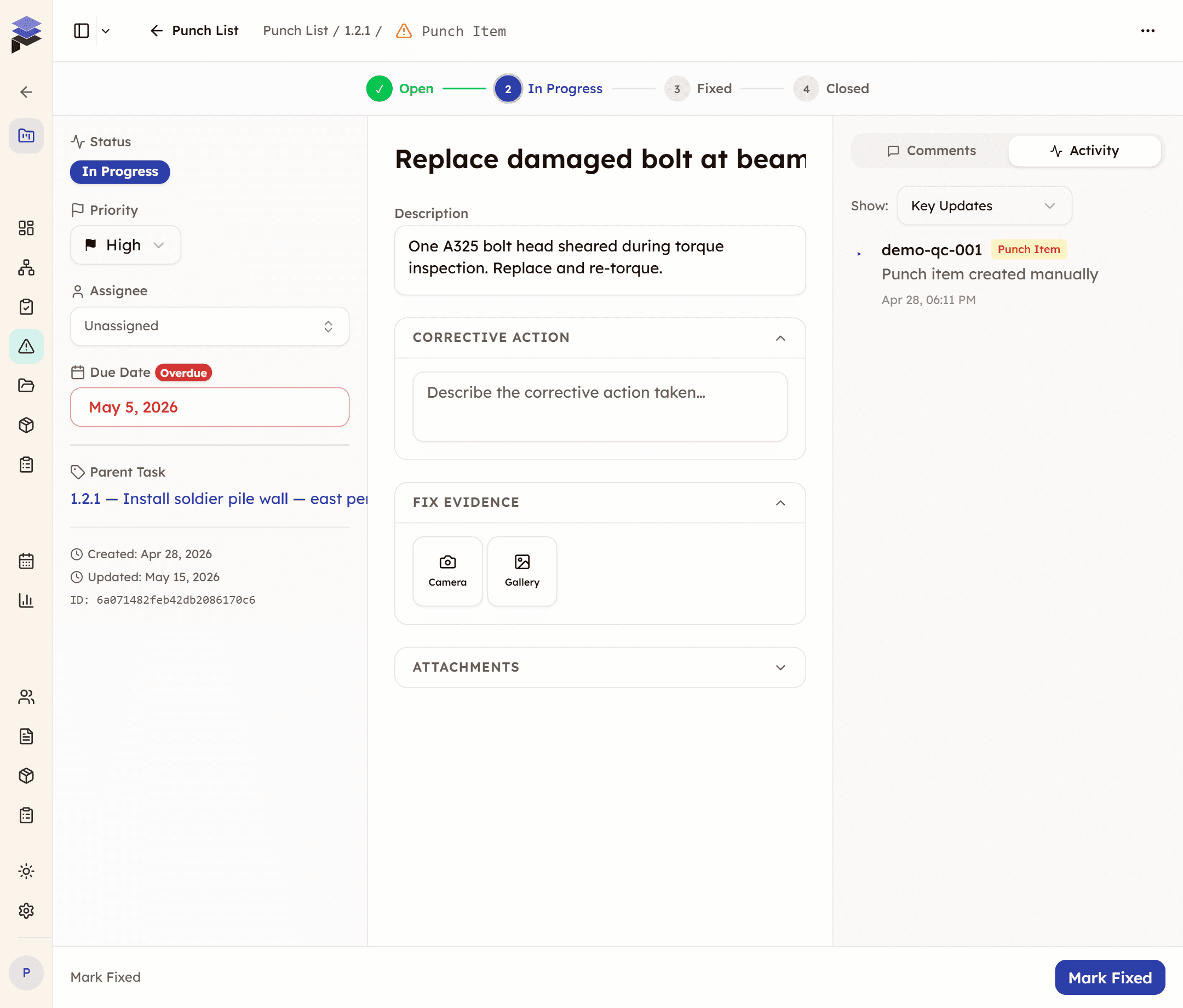
Every defect follows a defined path: Open → In Progress → Fixed → Closed. Color-coded status badges let anyone see where things stand at a glance.
Before & After Photo Evidence
Attach up to 5 photos per item directly from the field. Capture the defect when found and the repair when done. Visual proof the work was completed.
Inspection-Linked Traceability
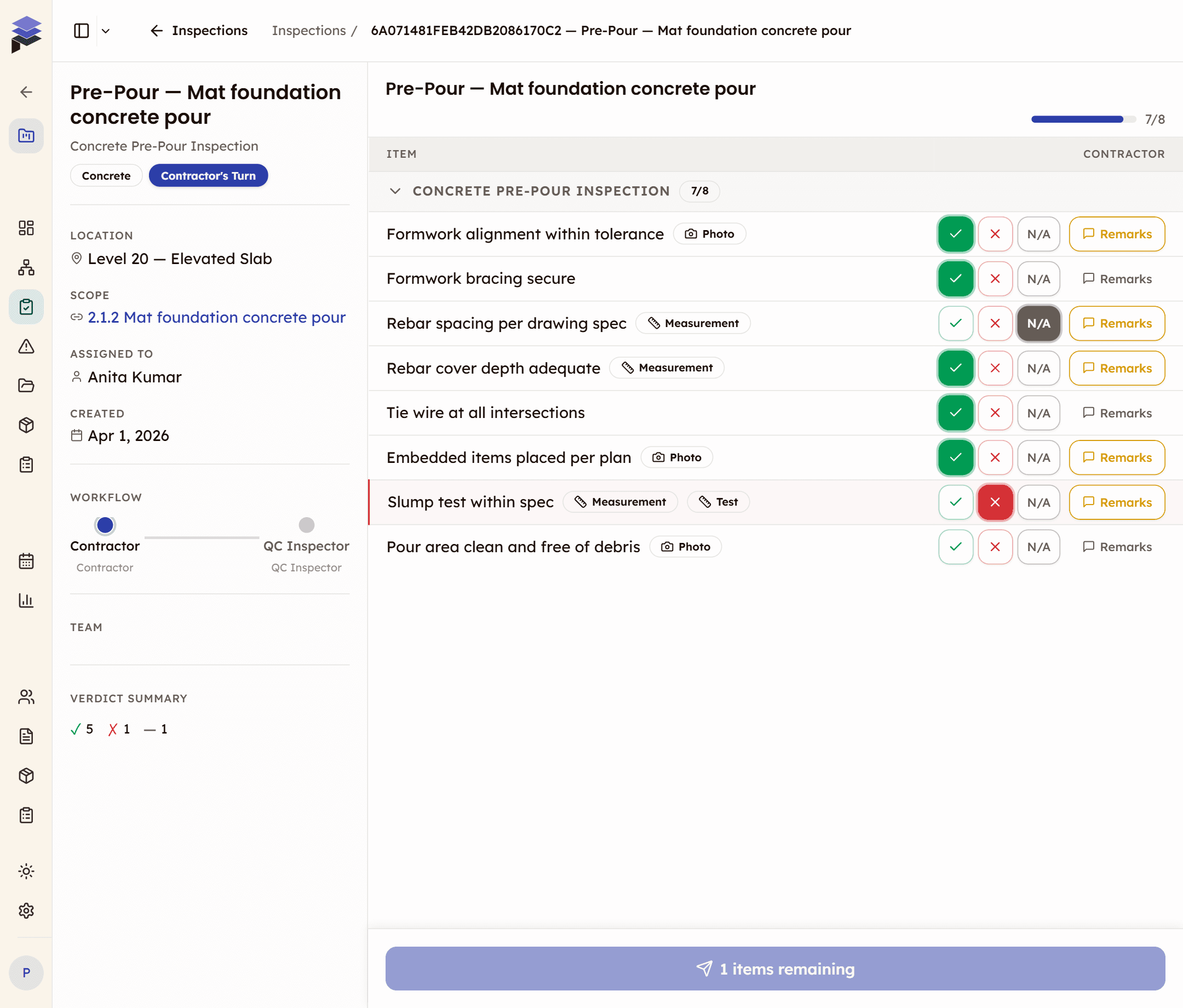
Items created from failed inspections automatically link back to the source inspection and checklist item. Full audit trail from defect to closure.
Reinspection Quality Gate
Items linked to inspections can't be closed without reinspection. The system prompts a re-review to verify the fix, preventing shortcuts on quality.
How it works
Three steps from defect discovery to verified closure.
Log the defect
Snap a photo, add a description, and assign it. Auto-links to the source inspection when created from a failed checklist item.
Track the fix
Assignee gets notified. They add repair notes and evidence photos as the work progresses.
Verify & close
Reinspection confirms the fix is done right. The item closes with a full audit trail from discovery to resolution.
Why switch from spreadsheets and email?
Most teams start with a shared spreadsheet or email thread. Here's what breaks and what changes.
The old way
- Defects tracked in email threads — items get buried, forgotten, or marked done without proof.
- No photo evidence linked to specific items — photos live in someone's camera roll or a shared folder nobody checks.
- No reinspection enforcement — items marked 'fixed' without anyone verifying the repair.
- No connection to the inspection that found the defect — traceability is manual and unreliable.
- Status updates require chasing people — 'Is item #47 done yet?' becomes a daily conversation.
With CivilFlow
- Every defect is a tracked item with status, assignee, priority, and due date — nothing falls through.
- Up to 5 photos per item — captured in-app, linked directly to the punch item, timestamped.
- Reinspection quality gate — inspection-linked items can't close without verified re-review.
- Auto-linked to source inspection — one click takes you from the defect to the failed checklist item.
- Real-time status badges — anyone on the team sees Open/In Progress/Fixed/Closed at a glance.
Built for the field
Punch lists are a field-first workflow. The mobile interface is designed for supers and foremen walking the site.
- Card layout instead of table — optimized for one-handed phone use
- Photo capture via device camera with automatic compression
- Badge on bottom nav shows count of open items assigned to you
Frequently asked questions

See Punch List in action
See how defects go from discovery to verified closure — with photo evidence, reinspection gates, and full audit trail.
Every defect tracked from discovery to resolution