Daily Reports
Structured daily field logs capturing everything that happens on site — weather, manpower, equipment, work performed, delays, visitors, safety, photos and notes. Submit, review, and approve in one workflow.
Close out the day, properly
Every section a superintendent needs — structured, auditable, and ready for review.
The whole day in one structured form
Nine sections take a superintendent from weather to safety in a single pass. One press of Fetch Weather pulls the day's conditions for the site — and every value stays hand-editable when the forecast and the site disagree.
- Temperature, conditions, wind, humidity and precipitation in one press
- Correct any of them by hand when the site doesn't match the forecast
- Visitors, safety (incidents, near misses, toolbox talks) and notes in the same form
- Nothing is mandatory until you submit — park a half-filled draft mid-shift
Manpower and equipment, crew by crew
One row per trade or subcontractor — company, trade, headcount, hours. Equipment gets the same treatment: type, description, hours used, hours idle, and status. The result is a daily record of crews and machines without a spreadsheet.
- Multiple crew entries for different trades on the same day
- Equipment status tracked as Active, Idle, or Breakdown
- Hours used and hours idle logged per machine
- Each day's crews and machines stay on that day's log
Work performed, and delays with a named cause
Describe the work per area and trade, with percent complete on each entry. Delays are categorised against nine causes — Weather, Material, Labor, Equipment, Design, Permit, Client, Subcontractor, Other — each carrying hours, a responsible party and a description.
- Free-text work log per area, with percent complete per entry
- Nine named delay causes — the delay is categorised, not just described
- Hours and responsible party recorded on every delay
- Work performed and delays both carry into the client report
Site photos, tagged where they were taken
Attach photos with captions, location notes, and section tags — Work, Safety, Delay, General. Each photo sits on the dated log it belongs to, so last Tuesday's pour is on last Tuesday's record, not somewhere in a camera roll.
- Every photo carries a section tag — Work, Safety, Delay or General
- Captions and location notes attach at capture time
- Photos stay on the log of the day they record
- Open a day's log and its photos are there — no camera-roll search
More in the Daily Reports module
The supporting register — everything else the module carries, on the record.
- One log per site per day
- One authoritative record of a given day, not four competing ones — tagged day, night or swing.
- Submit → review → approve
- Logs move from Draft to Submitted; a reviewer verifies the entries and approves or returns them. The server refuses an approval by the person who submitted it.
- Return with a note
- A returned log goes back to Draft with a written note — required, not optional — so the submitter knows exactly what to fix.
- A per-log edit history
- Each log carries its edits, newest first, with the timestamp and which sections changed — stamped by the server, not the client.
- The approval queue is a tab
- A Daily Reports tab carries a count of the logs awaiting review, and the submitter is notified in-app when a log is approved or returned.
- Feeds Client Reports
- Approved logs inside a report's date range compile into the client deliverable — manpower, work performed, delays, safety and weather.
Every view of the daily log
From end-of-day capture to approval — the working views.
The end-of-day form: weather, manpower, equipment, work, delays, visitors, safety, photos and notes.
How it works
Three steps from field data to approved record.
Fill in the daily log
At end of day, open the Daily Log form. Press Fetch Weather for the day's conditions. Fill in manpower counts, equipment used, work performed, delays, visitors, safety observations, and attach site photos. Nothing is required until you submit.
Why switch from paper daily logs?
Paper-based daily reports are the industry default. Here's what breaks and what changes.
The old way
- Paper forms filled by hand, then photographed or transcribed into a spreadsheet the next day. Errors and missing data are common.
- Weather written up from memory at the end of the day, if it is written up at all.
- Delays noted informally, with no cause, no hours and nobody named as responsible.
- Site photos live in camera rolls. Finding the right photo for last Tuesday's concrete pour means scrolling through hundreds of images.
- The weekly client update is compiled by hand, by reading through a stack of paper logs and re-typing summaries.
With Construction Hub
- A digital form in any browser. Data captured once, structured, filterable by date and status, with a server-stamped edit history.
- One press pulls the day's weather for the site. Correct it by hand when the site disagrees with the forecast.
- Delays categorised against nine named causes, with hours and a responsible party on every entry.
- Photos sit on the dated log they belong to, tagged by section (Work, Safety, Delay, General) with captions and location notes.
- Approved daily logs compile into Client Reports. The PM writes the narrative — the system assembles the data.
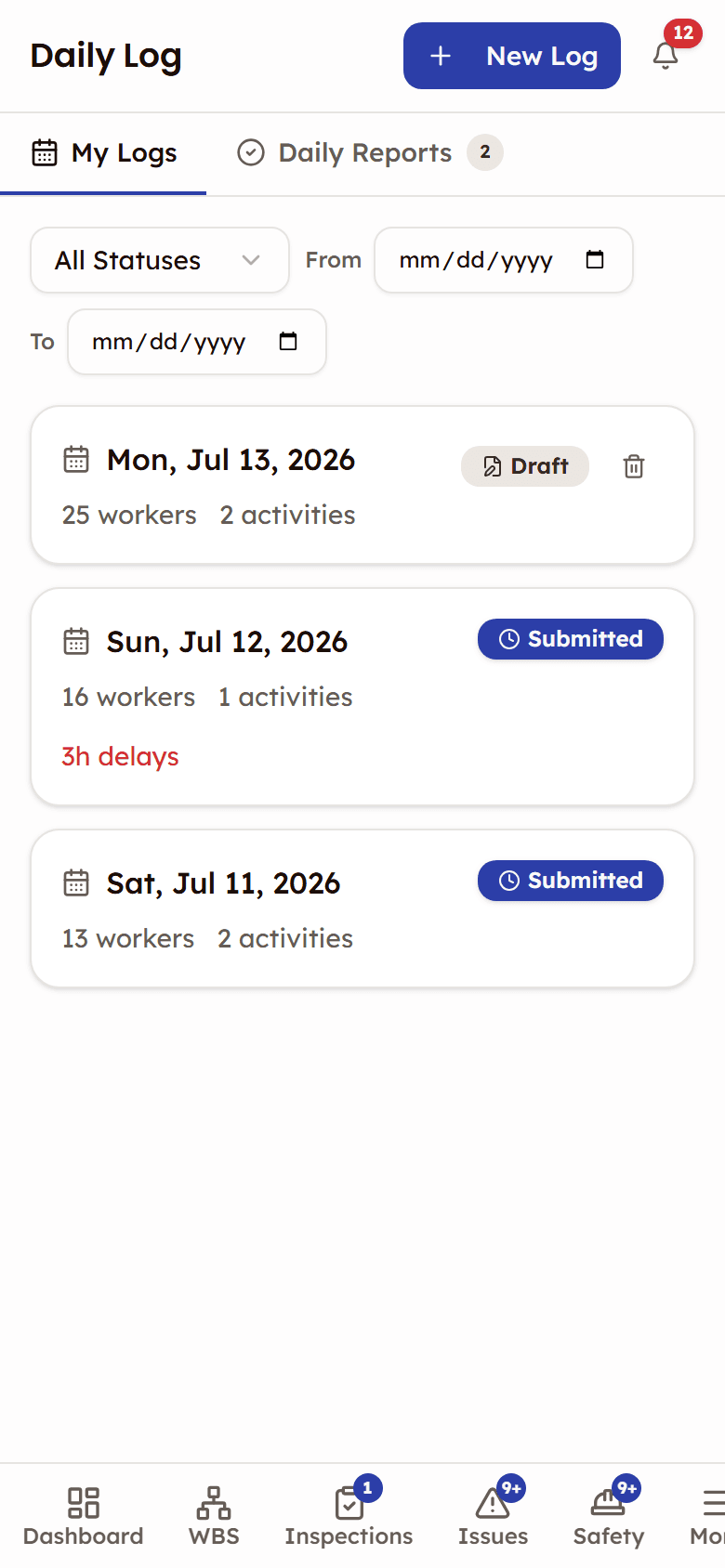
Built for the field
The daily log form is designed for superintendents and foremen filling it out at end of day on a phone. Every section works at phone width, in a browser.
- Single-column form with a sticky action bar, and photos added straight from the phone
- Submit and track approval status from the field
- The same form works on phones, tablets, and desktop
Frequently asked questions

See Daily Reports in action
See how field teams capture weather, manpower, work, delays, and photos — structured, reviewed, and ready for client reports.
Structured daily logs that compile into client deliverables