Permits to Work
Safety is in beta. Digital permit-to-work with a sign-off chain you set per permit and validity windows the status tracks. One register answers: who is doing high-risk work right now?
Approval, windows, and the permit register
A PTW system on one register — sign-off before work, a status that tracks the window, and the decisions on the record.
A sign-off chain you set per permit
Requested → prepared → signed off → closed out. Every permit is raised from a template that carries its own readiness checklist and required documents, so the reviewer sees what has been done — fire watch, gas testing, isolation, exclusion zones — before deciding. The permit is the checklist.
- Structured request: template, title, validity window, sign-off chain
- Sequential sign-off with approve / reject-with-reason
- The requester is notified when it is decided, sent back or closed out
- Full sign-off history on the permit record
Validity windows the status tracks
Paper permits go stale on a clipboard. Here the validity window drives the status: the register counts down, the permit flags itself as Expiring inside the last 24 hours, and Expired once the window passes. Work running long? Where your safety policy allows extensions, the end time can be pushed out and the change is recorded on the permit.
- A countdown with automatic Expiring and Expired states
- Status recomputed on every read — a lapsed permit never shows as Active
- Extensions are off unless your safety policy turns them on
- Expiring permits surface on the Safety Hub before they lapse
The permit register
One view answers the question every safety officer asks: what high-risk work is authorised right now, and who is it waiting on? Group the register by status or by permit type — hot work, confined space, height, lifting, excavation — and read each permit's window and sign-off progress straight off the row.
- Group by status or permit type, with a status badge on every row
- Columns for validity window, assigned party, sign-off progress and readiness
- Search by title and filter by status or permit type
- Feeds the Safety Hub and dashboard widgets
Requests that arrive ready to decide
A permit is requested in three steps — the permit, its validity window and the people who must sign it off, in order. The requester then answers the readiness checks and attaches the required documents, and only then submits it for approval. The approver decides with all of it in view, not a slip of paper.
- Three-step request: permit, validity window, sign-off chain
- Required documents attached on the permit, counted as n/m required
- Approvers decide with the checklist, documents and window in view
- Requester notified when the decision lands
More in the Permits module
The supporting register — everything else the module carries, on the record.
- Extensions on the record
- Where your safety policy allows an extension, the new end time is recorded on the permit's activity trail — no verbal 'just keep going'.
- Custom permit types
- Hot work, confined space, height, lifting, excavation, electrical isolation — plus any type your organization defines.
- Safety Hub integration
- Expiring and pending permits surface on the Safety Hub needs-attention feed before they lapse.
- Dashboard widgets
- Permit KPIs on the project dashboard, so the whole team sees permit load — not just the safety officer.
- Decision notifications
- The requester is notified when a permit is decided, sent back or closed out, and an approaching expiry reaches the project's safety officers and the requester.
Every view of dangerous work
From the sign-off chain to the permit register — four working views.
Every permit on the project with approval steps and expiry countdowns in one place.
How it works
From request to closed-out permit.
Request the permit
Whoever needs the permit raises it from a template — the permit, its time window, and the people who must sign it off, in order. The template brings its own readiness checklist and required documents.
Why switch from the permit book?
The paper permit book is a compliance artifact. This is a control system.
The old way
- Permits filled in triplicate at the site office — crews queue, work waits.
- Stale permits: the window lapsed hours ago but the slip still hangs on the board.
- Nobody can say what high-risk work is live without walking to the board.
- Extensions agreed verbally — 'finish up, it's fine' — with no record.
- After an event, reconstructing who held which permit takes days.
With Construction Hub
- Requests raised from a template, with the readiness checks and documents done before anyone signs.
- Windows tracked by the system — Expiring, then Expired, with nobody updating a slip.
- The register shows every permit, its window, and the party it is waiting on — from any device.
- Extensions, where your policy allows them, are recorded on the permit rather than agreed verbally.
- The full permit history — request, sign-offs, checklist results, documents and closure — is one click away.
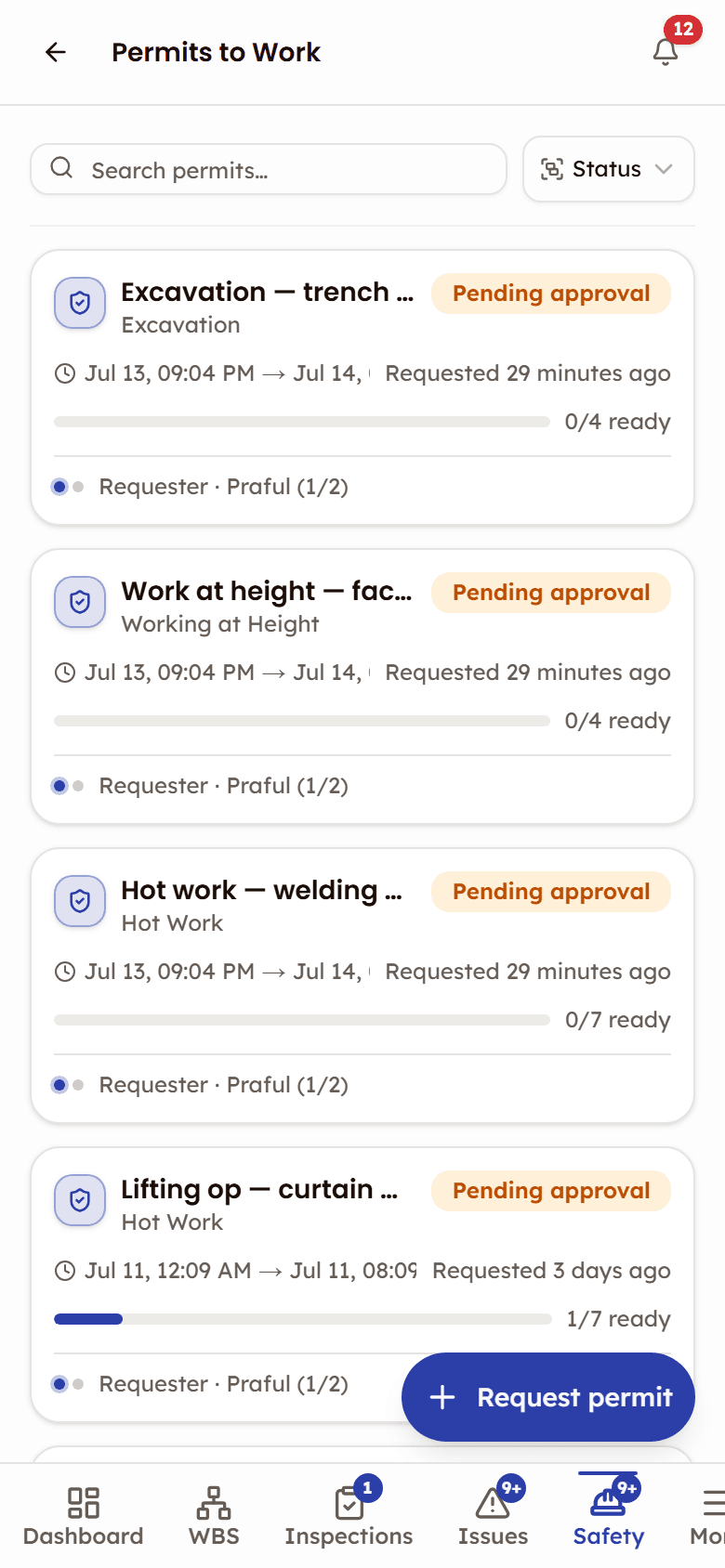
On site, in a phone browser
Safety is in beta. The permit register opens in a phone browser, so a permit's status can be checked from the work area.
- The status keeps itself current — Active, then Expiring in the last 24 hours, then Expired
- A permit reaches its approvers only once its readiness checks are answered and its required documents attached
- The requester is notified when the permit is decided, sent back or closed out
Frequently asked questions
Permits to Work, documented
The help that opens inside the app, on the web: every screen, every status, and what each role can do.
Open the Permits to Work docsWorks with
Safety (beta)
One safety console for the site — toolbox talks, walks, permits and incidents, with a needs-attention feed.
Safety Walks (beta)
Site walk-downs with photo observations that become tracked issues.
Issues
Issue tracking from discovery to closure — quality, safety, and punch list categories in one register.

See Permits to Work in action
See how sites run hot work, confined space, and height permits with validity windows the status tracks, on one register.
Permits flag Expiring 24 hours before the window closes