Safety Walks
Safety is in beta. Walk the site, log photo observations, and turn findings into tracked work — not lines in a report nobody reads. Ad-hoc first, on a desktop or in a phone browser.
From observation to fixed hazard
Fast capture in the field and a real escalation path from finding to closed issue.
Severity-rated photo observations
The observation logger is one bottom sheet: pick a severity, describe what you saw, attach photos, and — with one more tap — stamp it with your GPS position. Five severities: Critical, High, Medium, Low, and Good practice, because recognizing good practice is half of a working safety culture.
- Photos attach straight from the camera inside the capture sheet
- Five severities, including Good practice for what is being done right
- One tap on Capture location stamps the observation with GPS coordinates
- One bottom sheet — no page changes in the middle of a walk
Findings become work — promote or escalate
The walk report that nobody reads is the industry default. Here, every finding has a next step: promote it to a tracked issue in the Issues register, or escalate a serious one straight to a full incident investigation. The note and the photos carry over either way.
- One-tap promote to issue — the note, the photos, and the severity carry over
- The promoted issue then follows the full Issues lifecycle to closure
- Escalate to incident opens an investigation with the finding attached
- Promoted findings stay on the Safety Hub feed until the issue is closed
Built for walking the site
The walk stays on one screen: every observation with its severity, Raise issue and Escalate to incident on each card, and the capture sheet one tap away. It runs in a phone browser, so there is nothing to install before the walk.
- The capture sheet is one tap away from the walk
- Every observation card shows its severity at a glance
- Promote or escalate an observation without leaving the walk
- Runs in the phone browser you already carry
More in the Safety Walks module
The supporting register — everything else the module carries, on the record.
- Good-practice observations
- Good practice is a first-class severity — recognizing tagged rigging or good housekeeping builds the reporting culture. It is recorded, not promoted or escalated.
- GPS on demand
- Tap Capture location to stamp an observation with GPS coordinates and their accuracy — no typing.
- Safety Hub visibility
- Promoted findings stay on the Safety Hub needs-attention feed until the linked issue is closed.
- Full issue lifecycle
- Promoted findings become safety-category issues that carry the severity as priority and follow the Issues lifecycle to a closure someone has to press.
- Role-based access
- RBAC decides who can walk, who can promote findings, and who configures walk policies.
Every view of the walk-down
From starting the walk to closing the loop — three working views.
The live walk with its observation list and the lifted photo observation card.
How it works
Four steps from starting a walk to a closed issue.
Start a walk
Name the walk and go — it's a clean ad-hoc walk with the capture sheet one tap away.
Why switch from the notebook walk?
The traditional site walk produces a report. This one produces fixed hazards.
The old way
- Findings scribbled in a notebook, typed up hours later — half the context lost.
- Photos in a camera roll with no link to the finding they document.
- The walk report is emailed, filed, and forgotten. Nobody owns the fixes.
- Serious findings wait for the weekly meeting to become anyone's problem.
- Good practice goes unrecorded — the walk only ever logs what went wrong.
With Construction Hub
- Observations captured at the hazard, photo and severity attached.
- Every photo is bound to its observation and its walk.
- Findings promote to tracked issues — visible on the Safety Hub until they are closed.
- Serious findings escalate to incident investigations in one tap.
- Good practice is a severity of its own, recorded on the walk alongside the hazards.
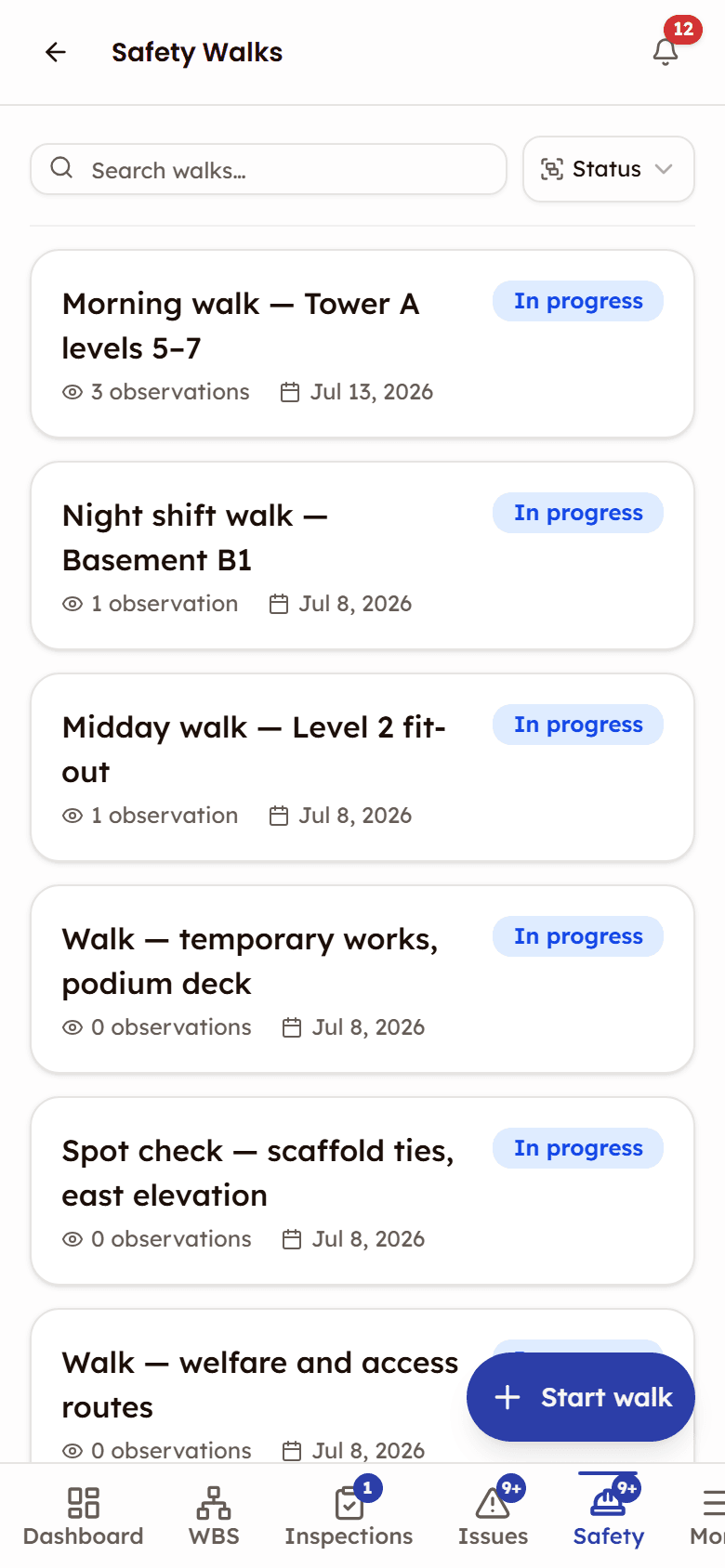
Built for walking the site
Safety is in beta. Walks run in a phone browser: start one from the list and log what you see as you go.
- Observation sheet with severity, note, photos, and optional GPS
- Photos attach straight from the camera inside the capture sheet
- Promote or escalate an observation without leaving the walk
Frequently asked questions
Safety Walks, documented
The help that opens inside the app, on the web: every screen, every status, and what each role can do.
Open the Safety Walks docsWorks with
Safety (beta)
One safety console for the site — toolbox talks, walks, permits and incidents, with a needs-attention feed.
Permits to Work (beta)
Digital permit-to-work with a sign-off chain per permit and validity windows the status tracks.
Issues
Issue tracking from discovery to closure — quality, safety, and punch list categories in one register.

See Safety Walks in action
See how safety officers run walk-downs with severity-rated photo observations and findings that become tracked work.
Findings tracked from observation to closure