Inspections
Quality inspections with customizable templates, a sequential sign-off chain, and automatic quality issue creation. From field execution to final approval — each party acts on their turn.
Purpose-built quality inspections
Templates, a sequential sign-off chain, field-first execution, and defects that land in Issues — not a form builder with a checkbox attached.
Fill the checklist once for every pillar on the pour
Most inspection tools make the checklist the unit of work, so twelve identical pillars mean twelve passes through the same twenty questions. Here the scope is the unit: link as many work-breakdown items or custom items as the inspection actually covers, answer the checklist once, and that single set of verdicts applies to all of them.
- Attach several WBS items and custom items to one inspection
- One set of verdicts covers the whole scope — answered once
- Each scope item can carry its own location or grid reference
- Or run it standalone against a free-text scope when there's no WBS to point at
Reusable templates for every inspection type
Build checklists once — concrete, MEP, safety, structural — and group them into collections for multi-part inspections in one go. Every item is answered with an explicit Pass, Fail or N/A.
- Checklist templates for any inspection type
- Collections bundle checklists for multi-part inspections
- An explicit Pass, Fail or N/A on every item
- Versions auto-increment on save; running inspections stay locked to their version
Multi-party review, signed in sequence
Inspections follow a Performer → Checker → Approver sequence. Each reviewer sees the earlier parties' verdicts before signing and passing it forward. A Fail recorded at review sends the inspection back to the performer as a numbered reinspection cycle, with the reviewer's remark on the failed item.
- Sequential handoff — each party acts only on their turn
- Reviewers see the earlier parties' verdicts on every item
- A Fail at review returns the inspection to the performer, remark on the item
- A counter tracks how many reinspection cycles have occurred
Two checklist layouts: List and Cards
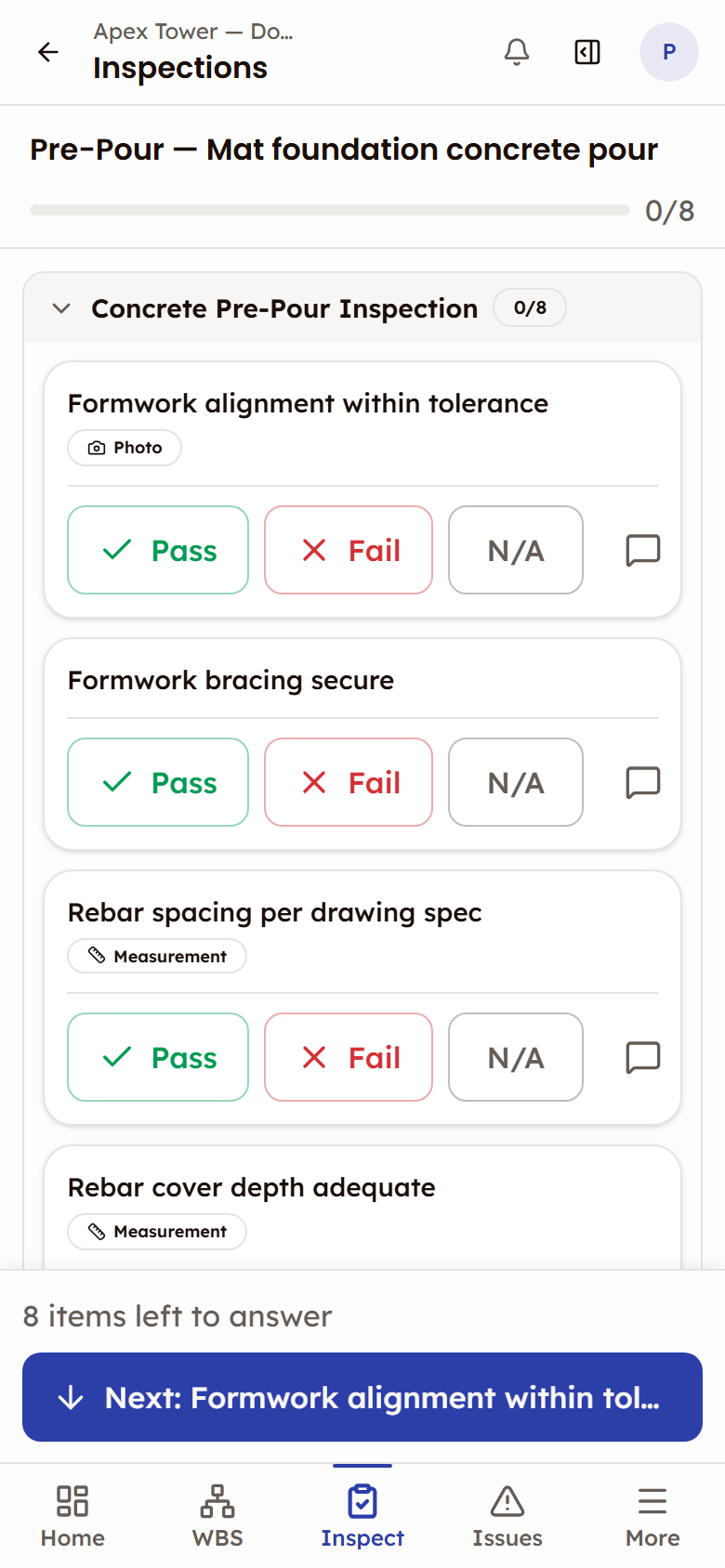
List puts every item in a compact list with inline verdicts. Cards gives each item its own card, with Pass, Fail and N/A across the width of the card and room for notes and photos. In a phone browser the checklist always runs as Cards.
- Cards: Pass, Fail and N/A across the width of each card
- List: inline verdicts, tap an item to open it for notes and photos
- Evidence can be made mandatory per item, and the item shows a chip for it
- Both layouts feed the same review workflow
Evidence on the verdict, defects straight to Issues
A verdict can carry photos taken on the spot from the device camera, and it records the location where it was made when the device allows. When an item fails, one toggle auto-creates a quality issue — the defect lands in Issues with the item's label, notes, evidence, and a link back to the inspection.
- Photos from the device camera, with the verdict's location recorded where the device allows
- Evidence tied to the specific checklist item, not a camera roll
- Failed items become quality issues with one toggle — no double-entry
- Issues follow their own lifecycle, linked back to the source inspection
More in the Inspections module
The supporting register — everything else the module carries, on the record.
- Reinspection flow
- A Fail at review cycles the inspection back to the performer as a numbered reinspection, with the remark on the failed item and the previous cycle's verdicts kept alongside.
- Read-only links for people without a login
- Send a completed inspection to a client rep or building-control officer as a link that expires in 7, 14, 30 or 90 days — optionally password-protected, capped by number of opens, and revocable, with a view count on the record.
- PDF export, on your terms
- Choose what the report carries: party sign-off details, scope and WBS items, linked issues, the location record, and the activity log at the detail level you pick. Checklist results are always included.
- Issues that close themselves
- When the performer reinspects, any issue from that inspection already marked Fixed is closed automatically and stamped as verified during reinspection.
- Single-party inspections
- Remove the Checker and Approver rows before creating the inspection, and one person performs and completes it.
- Template versioning
- Saving a template auto-increments its version; running inspections stay locked to the version they started with.
- A required measurement
- An item can demand a measured value, and its verdict will not save until the reading is entered.
- Conditional requirements on failure
- Marking Fail turns notes into a required remark, demands the item's specified evidence, and relabels the button Confirm Failure.
- Policies per organisation and project
- Configurable inspection rules — for example, mandatory photo evidence on a failed item, and what carries over into a reinspection. The organisation sets defaults; any project overrides.
- Prior cycles kept for comparison
- Reinspection verdicts sit alongside the previous cycle's rather than overwriting them, so what changed stays visible.
- Review history and activity log
- Every verdict change is kept per item with who made it and when, and the inspection carries an activity log of what happened to it.
Every view of the inspection
Two checklist layouts and the review workflow — the working views.
One card per item with Pass, Fail and N/A across it — the layout a phone browser always gets.
How it works
Four steps from template to approved inspection, with the review history and activity log on the record.
Create the inspection
Pick a collection or individual checklist, set the scope (WBS-linked or standalone), and assign the performer, checker, and approver.
Why switch from paper checklists?
Paper forms and spreadsheets still dominate field inspections. Here's what breaks and what changes.
The old way
- Paper checklists filled in the field, then transcribed to a spreadsheet days later — data entry errors and delays.
- No enforced review chain. The inspector signs off alone. Nobody checks the checker.
- Failed items noted on paper but never tracked — defects slip through because there's no follow-up system.
- Photos stored in camera rolls with no link to the specific checklist item they document.
- Reinspection means printing a new form and starting over. Previous results are lost or buried in a folder.
With Construction Hub
- Digital checklists executed on phones and tablets. Data is captured once, on the checklist itself, with no transcription.
- A multi-party inspection runs Performer → Checker → Approver in sequence, each party on their turn. Every verdict change is kept with who made it and when.
- Failed items auto-create quality issues with one toggle. Defects land in Issues with a link back.
- Photos attached to the specific checklist item, and each verdict records where it was made when the device allows. Evidence stays connected to context.
- Reinspection reuses the same inspection — the previous cycle's verdicts stay alongside the new ones. A counter tracks how many cycles occurred.
Built for the field
Inspections are a field-first workflow. In a phone browser the checklist runs one card per item, with room for notes and photos.
- One card per item at phone width, with Pass, Fail and N/A on each
- Evidence can be made mandatory per item, and the item shows a chip for it
- Photos from the device camera, with the verdict's location recorded where the device allows
Frequently asked questions
Works with
Issues
Issue tracking from discovery to closure — quality, safety, and punch list categories in one register.
Work Breakdown Structure
Hierarchical work planning with a nine-status construction workflow, read through seven lenses.
Reports & Analytics
Six pre-built analytics reports covering progress, quality, schedule, and cost — per project.

See Inspections in action
See how inspection teams run a sequential sign-off chain, auto-create quality issues from failed items, and work through the checklist in a phone browser.
Performer → Checker → Approver, signed in sequence