Safety
Safety is in beta. One safety console for the whole site — toolbox talks with digital sign-off, incident management with guarded close-out, site stand-down, and risk visibility. On a desktop or in a phone browser.
The daily rhythm, the bad day, and the proof
Toolbox talks keep crews briefed. Incident management handles the bad day properly. Trends prove the program works.
Toolbox talks with digital sign-off
Log the morning briefing — topic, location, attendance, photos. The sign-off cascade then takes it step by step through the configured chain (deliverer, PMC, safety head by default), and the talk does not close until every step is signed.
- Quick capture: topic, location, attendance, notes, photos
- Cascade steps are signed in order — the talk stays open until the last one
- Free-text attendance for rotating site labour without accounts
- Every talk keeps its own activity history for audits
Incidents with guarded close-out
Anyone with safety create access can report an incident or near miss with photos. Investigations capture the root cause and a corrective-action list — and the close is guarded server-side: root cause recorded, every action done, or it stays open.
- Field reporting with photo evidence and one of seven incident types
- Root cause plus a corrective-action list, each action marked open or done
- Close is rejected until the guard passes — regardless of who asks
- The record your HSE audit wants
Site stand-down — the bad-day button
Serious event? Flag a stand-down with one tap. Every member of the project is notified, and the stand-down is logged on the incident record along with the time it was lifted.
- One tap from the incident — no phone tree, no runner
- In-app notification to every project member (email and web push when configured)
- Stand-down window logged on the incident record
- Raise or lift in bulk from the incident register
Prove safety is improving — don't just claim it
The Safety Hub tracks open incidents against leading indicators — talks delivered this week, active permits, open walk findings. The 8-week trend shows which way things are moving, and dashboard widgets keep safety next to progress and cost.
- 8-week incident trend on the Safety Hub
- Leading indicators: talks this week, active permits, open walk findings
- A four-number KPI strip at the top of the Hub
- Six dashboard widgets for the project home
More in the Safety module
The supporting register — everything else the module carries, on the record.
- Safety Hub console
- One screen answers the morning question — open incidents, expiring permits, talks awaiting sign-off, unresolved walk findings.
- Dashboard widgets
- Six safety widgets on the project dashboard — open permits, permits expiring soon, talks this week, open walk findings, severity breakdown, and the incident trend.
- Layered safety policies
- System defaults, organization overrides, then project overrides — a high-risk project can run stricter rules.
- Escalation to Issues
- Walk findings promote to safety-category issues carrying the note, the photos, and the severity as priority — then follow the full Issues lifecycle.
Every view of site safety
One console, four working views — from the morning check to the audit trail.
The morning console: needs-attention feed, open incidents, permit status, and the 8-week trend.
How it works
From policy to daily rhythm to closed loop.
Set your safety policies
Configure once at organization level, override per project — talk cascade roles, walk escalation thresholds, permit rules, incident close-out gates. Policies drive the workflows, not the other way around.
Why switch from paper registers and WhatsApp?
Most sites run safety on paper forms, spreadsheets, and group chats. Here's what breaks and what changes.
The old way
- Toolbox talks signed on paper sheets that live in a site cabin folder — unverifiable at audit time.
- Incidents reported by phone call, investigated by email, closed by memory.
- Nobody can answer 'what dangerous work is happening right now?' without walking the site.
- Safety stats compiled monthly, by hand, after the fact — too late to change anything.
- Corrective actions agreed in meetings and forgotten by the next one.
With Construction Hub
- Talks captured digitally with attendance, photos, and an enforced sign-off chain.
- Incidents reported from the field in minutes, investigated in one panel, closed only when the guard passes.
- The Safety Hub shows open incidents, active permits, and unresolved findings on one shared screen.
- The 8-week trend and leading indicators update themselves, every day.
- Corrective actions are listed on the incident and block its closure until every one is done.
Built for the field
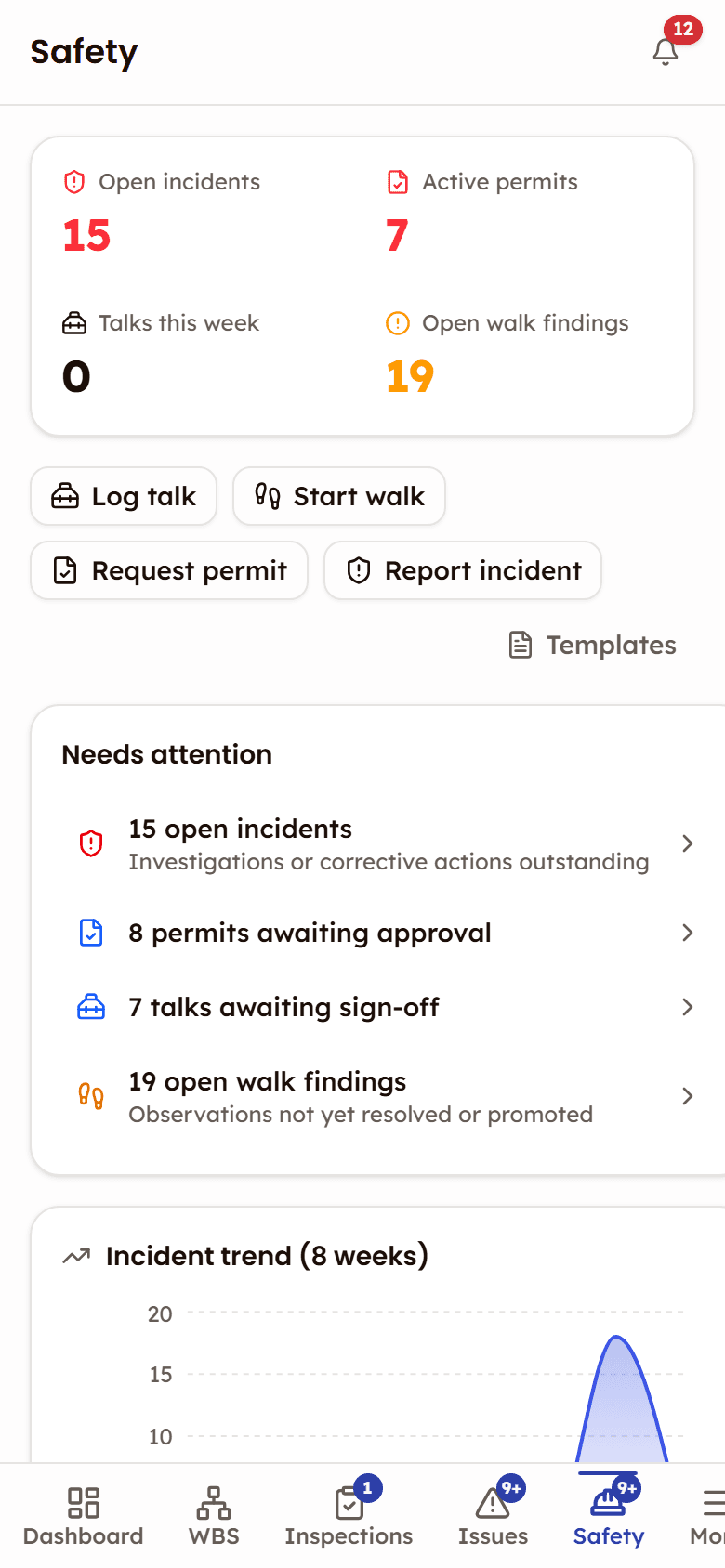
Safety is in beta. The Safety Hub opens in a phone browser with the same four counters, the needs-attention feed and its four capture actions.
- Log a talk, start a walk or report an incident from the Hub
- Photo evidence attaches straight from the camera
- Promote a walk finding to a tracked issue in one tap
Frequently asked questions
Safety, documented
The help that opens inside the app, on the web: every screen, every status, and what each role can do.
Open the Safety docsWorks with
Safety Walks (beta)
Site walk-downs with photo observations that become tracked issues.
Permits to Work (beta)
Digital permit-to-work with a sign-off chain per permit and validity windows the status tracks.
Issues
Issue tracking from discovery to closure — quality, safety, and punch list categories in one register.

See Safety in action
See how site teams run toolbox talks, manage incidents with guarded close-out, and keep safety in view — from one console.
Guarded close-out — no incident closes with gaps