Dashboard
Portfolio and project dashboards you arrange on the web app — drag-and-drop widgets, KPI counters read straight from the modules, and as many saved views as you need. See where the project stands at a glance.
Your project command center
A dashboard that adapts to how you work — not a static report you have to squint at.
A layout you build, not one you're given
On the web app, drag widgets to new positions and resize charts and lists from the corner. Add and remove widgets from a searchable catalogue, then save the layout to a named view — it waits in your view switcher whenever you come back.
- Drag widgets into position; resize charts and lists from the corner
- A searchable widget catalogue, grouped by module
- Widgets can also be moved with the keyboard
- Save as many named views as you like
Company dashboards and personal ones, with Duplicate as the bridge
A dashboard is either the organisation's — curated by an admin and seen by everyone it fits — or personal, private to whoever made it. Duplicate turns any dashboard you can see into a copy you own, so nobody is stuck on a layout somebody else controls.
- Organisation-wide dashboards and personal ones, side by side in the switcher
- Duplicate any dashboard you can see into a copy you own
- Personal views are private — changing yours never changes anyone else's
- A seeded layout can be reset to its original, never deleted
KPI counters and charts, read straight from the modules
KPI counters on a project dashboard — open work items, open issues, completion rate and overdue items, plus permit, toolbox-talk and walk-finding counters from Safety (beta) — read from the modules themselves, so there is no report to compile and nothing to keep in sync. Chart widgets cover donut, bar, area, radar, funnel, waffle and line.
- Current when you open the dashboard — no report to wait for
- Each widget arrives with the chart that suits it
- No spreadsheet to maintain — the numbers come from the work itself
A portfolio view across your projects
Managing more than one project? The Portfolio Dashboard is where you land. Portfolio Completion ranks your projects by completion, lowest first; the At-Risk Watchlist flags projects with overdue work, recent safety incidents or an on-hold status.
- Portfolio Completion — projects ranked by completion, lowest first
- At-Risk Watchlist — overdue work, recent incidents, on-hold projects
- Overdue by Project, Spend by Project (material spend) and Manpower by Project as charts
More in the Dashboard module
More of what the module carries, on the record.
- Read on a phone, arranged at a desk
- Widgets stack down to one column on a narrow screen and the toolbar stays reachable. Arranging the canvas is a desk job, by design.
- Layouts seeded for ten roles
- A new organisation is seeded with eleven layouts — one shared portfolio view and ten project views, from Owner and Project Manager to QC Inspector and Client Representative.
- Reset a seeded layout
- A seeded layout — or your own copy of one — can be reset to its original from the options menu after it has been rearranged, without touching your other views.
- Three widget categories
- KPI tiles, charts and lists — each catalogue card shows its category and the size the widget arrives at.
- Widgets render more when given more room
- Make a widget wider and it switches to a two-column or side-legend layout; make it taller and it shows more rows.
- Every empty state is written
- “All projects on track”, “No incidents — keep it up”, “No permits expiring soon”. The dashboard says something useful with no data in it.
Every view of the project
From the seeded layout to the portfolio overview — the working views.
KPI counters and a chart, read straight from the modules — where the project stands.
How it works
Three steps from a seeded dashboard to your personalized command center.
Open your dashboard
The Portfolio Dashboard is where sign-in lands, and inside each project there is a project Dashboard. Ten project roles start on a layout seeded for their job, so people in those roles begin with no setup at all.
Why switch from manual reporting?
Weekly spreadsheet reports and slide decks are the usual stand-in. Here's what breaks and what changes.
The old way
- Status reports compiled manually every week, pulling numbers from different sources.
- Data is always stale — by the time the report is sent, the numbers have already changed.
- One-size-fits-all reports. The PM, super, and client all get the same view whether it's useful or not.
- The report and the work live in different places — a number looks wrong and you start investigating in another spreadsheet.
- Portfolio visibility requires a separate master spreadsheet that someone maintains by hand.
With Construction Hub
- No compilation step. Widgets read from the modules, so opening the dashboard is the whole process.
- Current when you open it. KPIs and charts are read from the modules, not copied into a report.
- Saved views for each purpose. Quick daily check, headline summary, risk-focused — all in one view switcher.
- The dashboard and the work are the same data. A trend or a breakdown sits beside the counter it explains.
- The Portfolio Dashboard reads across your projects in one place — completion, overdue work and an at-risk watchlist.
Read it in the field
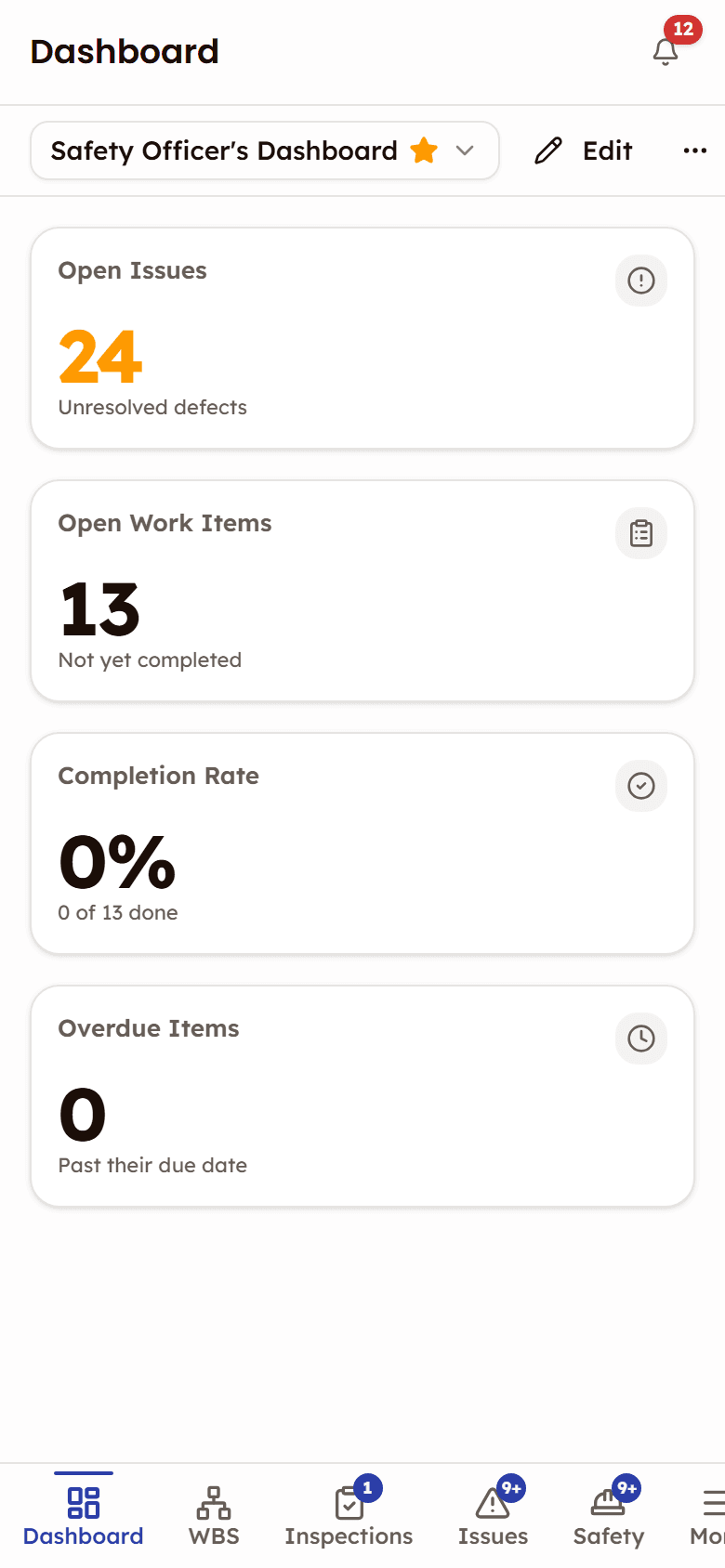
Dashboards are read on a phone and arranged at a desk. Open the web app in a phone browser and the widgets stack down to one column, with the toolbar still in reach.
- Four columns on a desktop, narrowing to two and then one as the screen shrinks
- The toolbar stays reachable and scrolls sideways on a narrow screen
- Add or remove widgets from a phone; arrange the layout at a desk
Frequently asked questions
Works with
Reports & Analytics
Six pre-built analytics reports covering progress, quality, schedule, and cost — per project.
Work Breakdown Structure
Hierarchical work planning with a nine-status construction workflow, read through seven lenses.
Resources
Inventory tracking, delivery management, and vendor oversight.

See Dashboard in action
See how a customizable canvas, KPI counters read straight from the modules, and saved views give you the exact project overview you need.
Your project command center — arranged how you want it