Entry 007
Best Construction Inspection Software (2026)
Five inspection tools, honestly assessed — including ours, and including what ours doesn't do. Most software ranking for construction inspection searches was built for facilities, hospitality or food service. Here's what each one is genuinely good at, and where each one stops.

Praful Rudra · Co-Founder & CEO
Updated 14 min read
Let me get the awkward part out of the way: I run PleoStack, and PleoStack is first on this list. You are right to be suspicious of that, because every vendor-written listicle on this search term does exactly the same thing, and most of them are useless as a result.
So here's the deal. I've put real reasons under every entry, named the things our product doesn't do, and given each competitor credit for what it's genuinely better at — including a couple of things where they beat us outright. If you finish this and buy someone else's product because it fits your process better, that's a fine outcome. Wasting a fortnight in a trial that was never going to work is not.
One observation before the list, because it explains most of what follows. Open the demo videos for the top-ranking "construction inspection" tools and you'll find one checking whether a hotel lobby meets brand standards, one securing a restroom door frame, and one inspecting the floor of a burger restaurant. These are good products that happen to be aimed somewhere else. They rank on construction terms because they publish more than construction vendors do, which is a marketing achievement rather than a product one.
- PleoStack — built for construction QA specifically: scope linked to the work breakdown, ITP-shaped items, a fail that forces evidence. No scoring, no conditional branching.
- Mitti (by SafetyCulture) — the slickest execution experience here, and the only one with real conditional logic. Facilities and safety heritage shows in the construction fit.
- GoAudits — the best scoring and corrective-action engine on this list. The interface has been around a while and it shows.
- Xenia — a broad operations platform. Strong offline, clean verdicts, but a failure doesn't start anything on its own.
- Fieldwire — genuinely construction-native and excellent at coordination. Its checklist has no fail state, which is a bigger deal than it sounds.
1. PleoStack Construction Hub
Best for: contractors, PMCs and EPCs running ITP-driven QA where a failed inspection needs to affect the programme.
Our argument is narrow and I'd rather state it plainly than pad it. Three things are different, and everything else about us is table stakes.
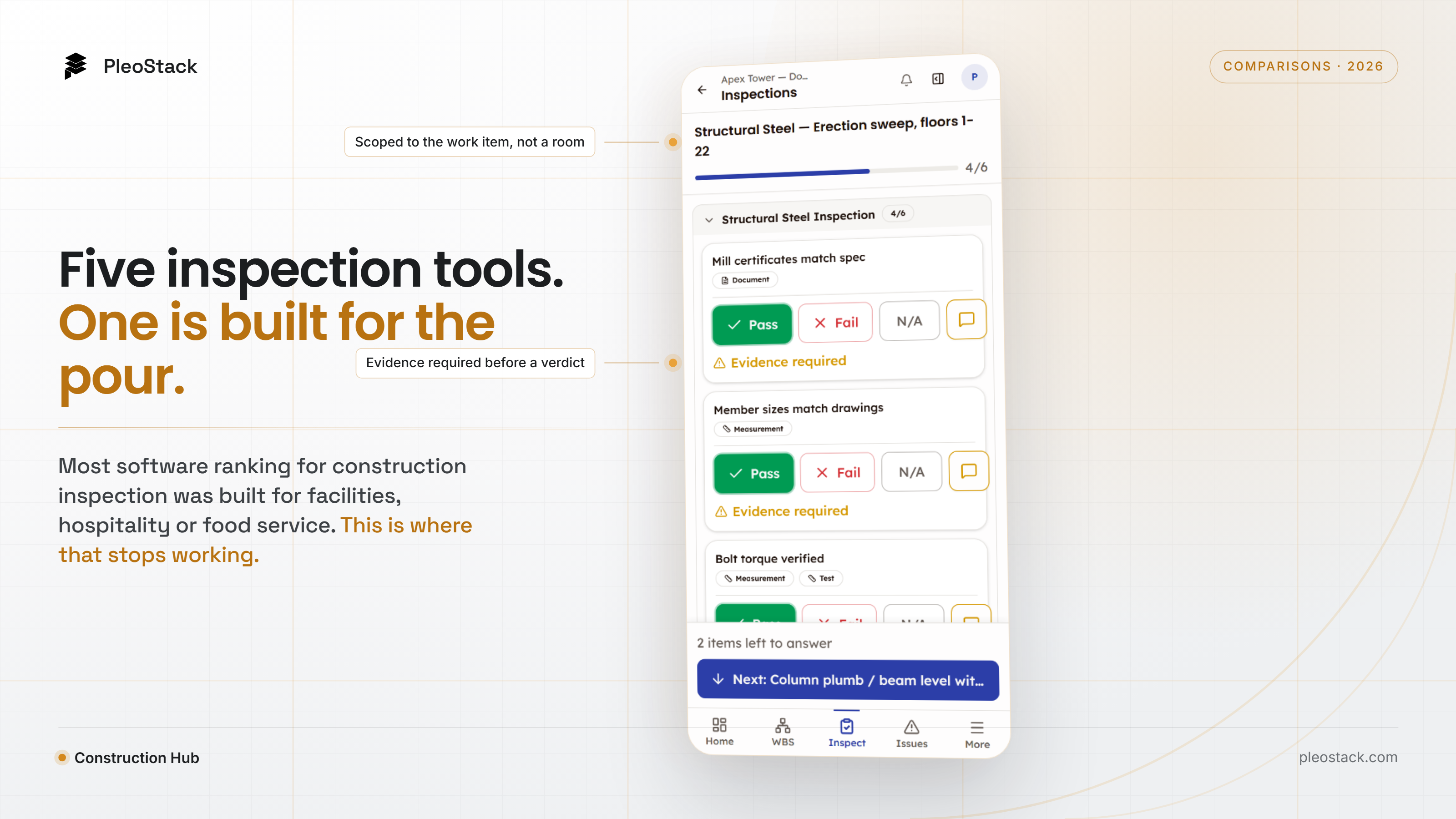
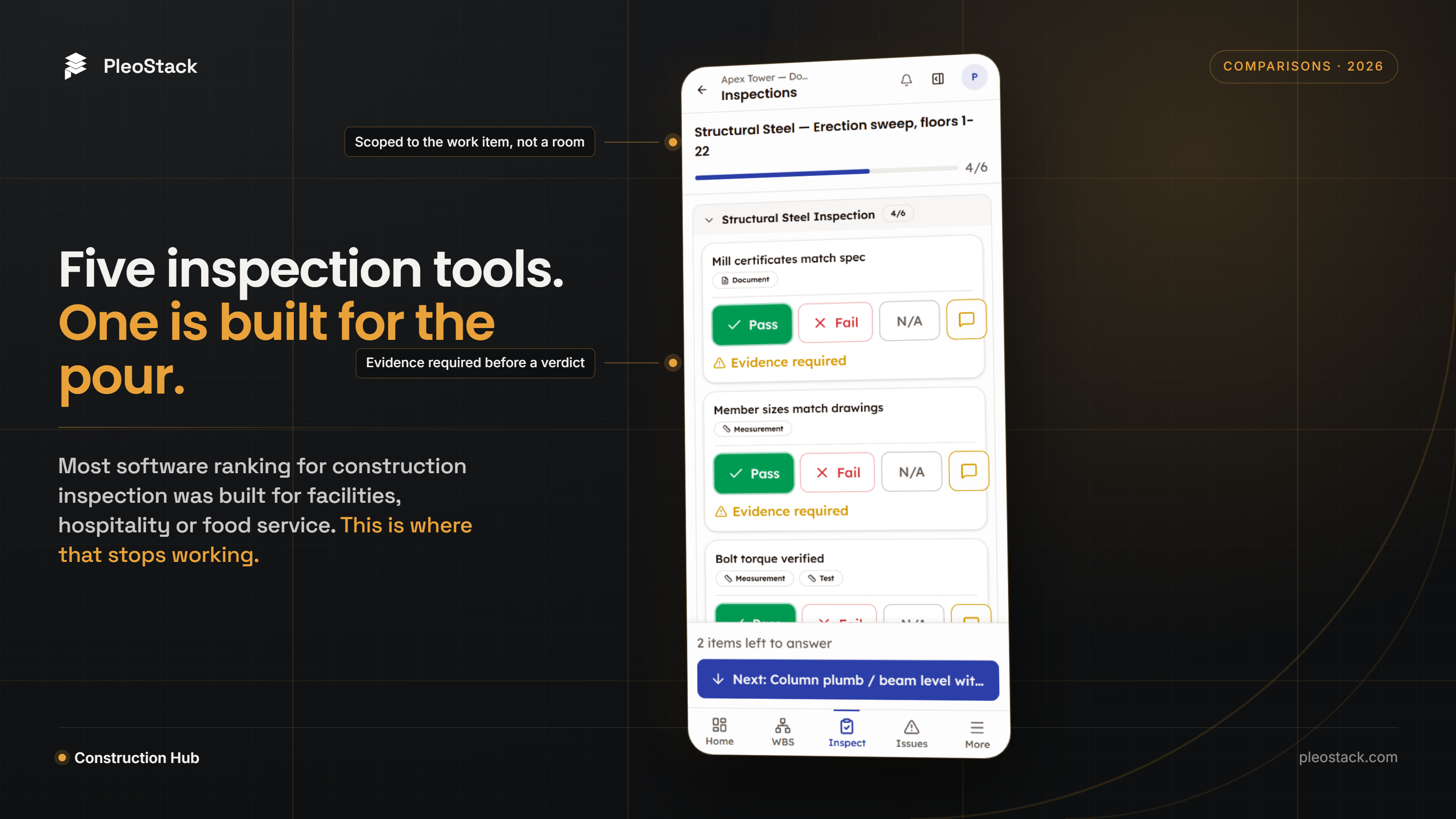
An inspection is scoped to the work, not the place. Every other tool here anchors an inspection to a location hierarchy or a pin on a drawing. We anchor it to the work breakdown structure item — 2.1.2 Mat foundation concrete pour. Location is still recorded, because you need to find the thing. But the scope is the activity, so a failure lands on the piece of work that's now held rather than on a coordinate.
You fill the checklist once for the whole pour. This is the one I'd most want you to test in a demo, because it's where the time actually goes. Twelve identical pillars on the same pour, one twenty-line checklist: in most tools that's twelve passes through the same twenty questions, because the checklist is the unit of work. Here the scope is — attach as many work-breakdown items or custom items as the inspection genuinely covers, answer the checklist once, and that single set of verdicts applies to all of them.
Worth being precise about the competitive line, because it's narrower than it first sounds. Mitti's repeat sections also put many items into one inspection. The difference is how many times the inspector answers: they repeat the question set once per item, we attach the scope to one verdict set. If your checklists are short, that gap barely matters. If they're twenty lines and the pour has a dozen elements, it's the difference between an afternoon and twenty minutes.
Failing an item is an event, not a value. Mark Fail and the notes box becomes a required remark, the item demands the specific evidence type it was authored for — photograph, document or measurement — a required test result blocks the verdict until there's an actual reading, and a tracked issue can be raised carrying its own Open → In Progress → Fixed → Closed lifecycle. The save button changes to Confirm Failure, which is the honest label.
Those requirements are set per item when the checklist is authored — severity, which evidence type is demanded, whether a test reading is mandatory, and the spec clause the item is checked against.
Beyond that: re-inspection is a numbered cycle on the same record rather than a fresh blank form, and what carries into the next cycle is configurable separately per role — the contractor redoing the work starts clean, the consultant only re-judges what failed, and you can cap how many cycles are allowed before it escalates.
Sign-off is a declared sequence — contractor performs, consultant checks, client approves — with the order enforced server-side rather than by convention.
Two smaller things that turn out to matter more than they sound. Issues close themselves. When the contractor starts the re-inspection, any issue from that inspection already marked Fixed is closed automatically and stamped as verified during re-inspection — because the usual failure of a corrective-action process isn't raising the issues, it's that nobody goes back and closes them. And you can send the finished record to someone with no login: a read-only link that expires in 7 to 90 days, optionally password-protected and capped by number of opens, revocable, with a view count so you know whether the client's engineer actually opened it.
What we don't do, and you should know before a demo:
- No scoring or auto-fail. GoAudits, Xenia and Mitti all give you a weighted percentage per audit. We give you verdicts and issues. If your client reports a compliance score every month, we'd make you calculate it.
- No conditional branching. Mitti can reveal a follow-up question based on an answer. We can't. Our items escalate their own evidence bar on a fail, which is a different thing and not a substitute.
- No signature capture. Fieldwire lets a non-user sign a form on the spot, timestamped. We have no signature capture at all — so if a building inspector's signature on the record is part of your process, that's a real gap and Fieldwire is genuinely better at it. What we do have is a controlled read-only link: you can send a completed inspection to someone with no account, set it to expire, put a password on it and revoke it. That covers showing them the record. It does not cover signing.
- No offline mode. PleoStack is a web app and needs a connection to save work. Every other tool on this list works offline, so if your inspectors spend the day out of signal, weigh that honestly.
- Smaller template library. The incumbents ship hundreds of pre-built checklists. We ship a construction set and a builder. If you want a template for inspecting a walk-in freezer, they have one and we don't.
2. Mitti (by SafetyCulture)
Best for: multi-site operations that want the best inspection execution experience available, across mixed asset types.
Credit where it's due: this is the most polished inspection app in this comparison, and the only one here with genuine conditional logic. Answer "No" and it can reveal a follow-up question — what's the problem? — and force you to create an action before you move on. That's a real capability and we don't have it.
The response types are broad too: rating scales, numeric sliders, custom sets with colours and flags, live scoring as you go. The template library is deep, the mobile experience is well-built, and offline works properly.
Left: a ‘No’ reveals a follow-up question and can force an action before you continue. Right: response types and live scoring — the numeric input is a 1–10 slider. Note the subject matter in both. Source: SafetyCulture’s YouTube channel.
Where it stops for construction: the heritage is safety and facilities, and it shapes the model. Inspections attach to a site or location hierarchy rather than to work, so a failure records where rather than what's held. There's no RFI, no submittal, no work breakdown for it to connect to — construction integration is via connectors to platforms like Procore rather than a native data model.
Two smaller things worth knowing. Its numeric input is typically a slider or rating, which is fine for "how clean is this" and awkward for "28-day compressive strength in MPa" — an ITP needs a reading against a spec clause, not a position on a scale. And its own documentation notes that a template can only have one approver, so a contractor → consultant → client chain isn't a native shape.
If we didn't exist and your work were mostly repeatable site audits rather than ITP-driven QA, this is the one I'd point you at.
3. GoAudits
Best for: teams whose reporting is built around audit scores and a tightly managed corrective-action loop.
GoAudits has the strongest scoring engine here — weighted scores, grade bands, and per-question auto-fail that can sink an entire audit on one critical item. If a single missing fire extinguisher must fail the whole inspection regardless of the other forty items, that's a genuinely useful mechanic and we have no equivalent.
Its corrective-action workflow is also more thorough than most: an action carries an assignee, a deadline, a priority and an escalation path, and closing one asks for a comment, proof images, a status and a completion date. That's real discipline, and plenty of tools stop at "mark as done".
The corrective-action loop, GoAudits’ genuine strength: an action raised against a specific question, then closed with a comment, proof images, a status and a completion date — four fields and several taps per finding. Source: GoAudits’ YouTube channel.
Where it stops: the interface is a generation behind the rest of this list — a lot of forms, a lot of fields, a lot of taps to close a single finding. It's entirely functional and nobody will be delighted by it. The data model is audit-and-action rather than construction: inspections attach to sites and locations, and its demo content is restaurants and retail for a reason. If your QA process is "score the site monthly", it fits well. If it's "this pour cannot proceed until the consultant signs", it doesn't.
4. Xenia
Best for: facilities and operations teams that want inspections, work orders and maintenance in one place.
Xenia is a broad operations platform rather than an inspection specialist, and that breadth is the point — checklists, work orders, assets and scheduling together. The inspection UI itself is clean and quick: Pass / Fail / N/A with a note and a photo per item, sensible sectioning, and offline that covers location hierarchies, signatures and scoring.
Where it stops: a failure doesn't start anything by itself. In its own walkthrough, when a check fails you open a blank Create Task, retype the problem, pick a checklist, set an assignee and a priority. Every piece of that context existed a moment earlier in the inspection. On a snagging walk with forty findings, that difference compounds into an afternoon.
The same walk, two screens apart. Left: verdict capture, one of the better execution screens here. Right: the failure path — a blank form. What failed, where, and who was standing there does not carry across. Source: Xenia’s YouTube channel.
There's also no chained follow-up — a failed item doesn't ask a second question — and nothing construction-specific in the data model. As with the others, its demo content tells you the target: restrooms, sinks, door frames.
5. Fieldwire (by Hilti)
Best for: field coordination, drawing-centric task management, and teams whose inspections are effectively walkthroughs.
Fieldwire is construction-native and I want to be clear about that, because it's the one product here that genuinely has the industry's data model — RFIs, submittals, drawings, tasks. Its plan viewer is fast, its offline is a headline capability rather than a footnote, and its form signatures are better than ours in one specific way: they're timestamped, support multiple signers, and a person without a Fieldwire account can sign. If you need a building inspector's signature on the record without buying them a seat, that's a real advantage.
Where it stops, and it's structural: there is no inspection module. You build an inspection by creating a task and attaching a checklist to it — and in Fieldwire's own documentation, you mark each checklist item "complete (tick), incomplete (cross), or not applicable (hyphen)".
There's no fail. The red cross means incomplete, so a pour that failed and a pour nobody has walked yet carry the same mark.
Everything else follows from that. There's no fail state to attach a mandatory-evidence rule to. Photos and comments attach to the parent task rather than to the line that failed. Nothing is raised automatically — their guide's advice on finding a defect mid-inspection is to "just create a task for it". And there's no fail rate to report, because there's nothing being counted.
Their Forms module (Business tier and above) does carry a verdict — Approved / Not approved / Approved as noted — but it applies to the whole form, so you can't fail one line and pass the rest.
None of this makes it a bad product. It's a strong coordination tool being asked to do QA/QC it wasn't designed for, and it's a useful illustration that having the construction data model isn't sufficient on its own — the inspection layer has to produce something for that model to receive.
Quick comparison
| Capability | PleoStack | Mitti | GoAudits | Xenia | Fieldwire |
|---|---|---|---|---|---|
| Item-level pass/fail | Yes | Yes | Yes | Yes | No — complete / incomplete / N-A |
| Anchored to | Work breakdown item | Location | Site | Location / asset | Drawing pin + task |
| Many scope items, one set of verdicts | Yes — answered once | Repeat sections — answered once per item | No — multi-site means many audits | — | No — importer creates N separate tasks |
| Enforced sequential multi-party sign-off | Yes — order enforced server-side | No — one approver per template | — | — | Multi-signer forms, but no per-item turns |
| Fail raises a tracked issue | Yes, policy-gated | Yes | Yes | Manual | Manual |
| Fixed issues close on re-inspection | Yes — automatic | — | — | — | — |
| Required evidence on fail | Yes, typed | Yes | — | On failed response | — |
| Test reading against a standard | Yes | Slider / rating | — | — | — |
| Per-item code / spec reference | Yes — e.g. ACI 318-14 §25.2 | — | — | — | — |
| Re-inspection carry-over per role | Yes | — | — | — | — |
| Share the record with a non-user | Yes — expiring, password-protected link | — | — | — | — |
| Works offline | No — needs a connection | Yes | Yes | Yes | Yes — headline capability |
| Conditional branching (an answer reveals a new question) | No — see note below | Yes | — | — | — |
| Audit scoring / auto-fail | No | Yes | Yes | Yes | — |
| Non-user can sign | No — no signature capture | — | — | — | Yes |
A note on the branching row, because it's the one people ask about. We don't have branched questions and Mitti does — an answer there can reveal a follow-up and force an action. What we have is conditional requirements: failing an item escalates that item's own bar — required remark, the specific evidence type it was authored for, a blocked verdict until a test reading exists. Same goal, different mechanism, and not a substitute if your process genuinely depends on revealing follow-up questions.
"—" means we didn't verify it, not that the tool can't do it. Rows marked that way were outside what the vendor documents publicly; check them yourself in a demo rather than taking a blank from a competitor's blog as a no.
How to choose without wasting a fortnight
Skip the feature grid and ask three questions in the demo:
- Fail an item, then ask what else in the system now knows. Not "can I export a report" — what actually changed. If nothing did, the inspection is a document.
- Ask what the inspection is attached to. A room, a pin, or the activity in the programme. This determines everything downstream and is almost never on the comparison page.
- Fail the same item twice. If round two is a new blank form rather than a second cycle on the same record, you don't have an inspection register — you have a folder of PDFs with a naming convention.
If your process is scored site audits on a cycle, GoAudits or Mitti will serve you well. If you want inspections bundled with maintenance and work orders, look at Xenia. If your real problem is field coordination around drawings, Fieldwire is excellent at that and its checklist limitation may simply not matter to you.
If your inspections are ITP-driven — hold points, witness points, measured values against named standards, and a sign-off chain that runs contractor to consultant to client — that's the case we built Inspections for. Book a demo and bring one of your own ITPs rather than letting us pick the example; it's a much better test.
And if you'd rather not talk to anyone yet, our free inspection checklists run pass/fail/N-A on a phone with no account — concrete, structural steel, MEP, electrical and waterproofing — with a PDF or XLSX export. It won't do any of the things I've argued matter in this article. It will stop the checklist getting printed, which is a start.
Common questions
What is the best inspection software for construction?
It depends on what your process actually is. If you run scored site audits on a cycle, GoAudits or Mitti will serve you well. If you want inspections bundled with maintenance and work orders, Xenia fits. If your real problem is field coordination around drawings, Fieldwire is excellent at that. If your inspections are ITP-driven — hold points, measured values against named standards, and a contractor-to-consultant-to-client sign-off chain — that is the case PleoStack Construction Hub was built for.
Why do most inspection apps that rank for construction terms feel wrong on site?
Most of them were built for facilities, hospitality or food service, and their data model follows: an inspection is anchored to a location hierarchy — region, site, building, floor, room. That is correct where the location is the unit of work. Construction is a sequence of activities that each happen once, in an order, with dependencies, so recording a failure at a coordinate misses the thing that matters commercially: which piece of work is now held, and what was waiting behind it.
What should happen when an inspector marks an item as failed?
In most tools it sets a value: the row turns red and the failure waits in a PDF for someone to notice. A failure is better treated as an event — it should force the specific evidence the item was authored for, block the verdict until a required test reading exists, and be able to raise a tracked issue with its own lifecycle. A useful demo test is to fail an item and then ask what else in the system now knows. If nothing changed, the inspection is a document.
Does Fieldwire have an inspection module?
No. In Fieldwire you build an inspection by creating a task and attaching a checklist to it, and in its own documentation those checklist items are marked complete (tick), incomplete (cross), or not applicable (hyphen). There is no fail state, so a pour that failed and a pour nobody has walked yet carry the same mark. Its Forms module (Business tier and above) does carry Approved / Not approved / Approved as noted, but that verdict applies to the whole form rather than to one line.
What does PleoStack not do?
No scoring or auto-fail — you get verdicts and issues rather than a weighted percentage per audit. No conditional branching, so an answer cannot reveal a follow-up question, though failing an item does escalate that item's own evidence requirements. No signature capture at all, so if you need a building inspector to sign on the spot, Fieldwire does that and we don't — we can send them a controlled read-only link instead, which covers showing them the record but not signing it. No offline mode — PleoStack needs a connection to save work. And the template library is a construction set plus a builder, not the hundreds of pre-built checklists the incumbents ship.
Adjacent entries
· Industry Insights
Why Generic Inspection Apps Fail on Construction Sites
Hemanth Surya · 9 min read


· Product Updates
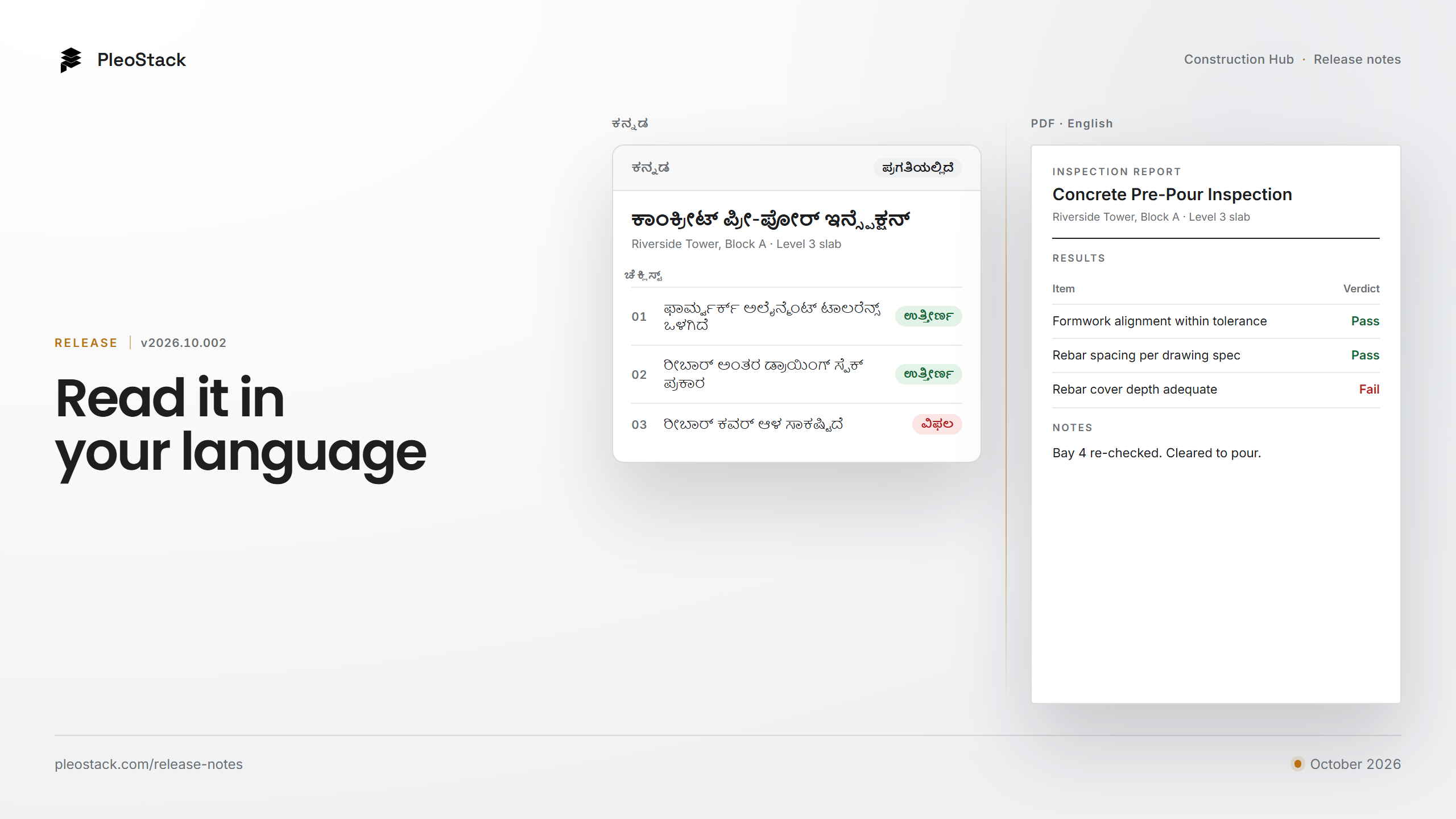
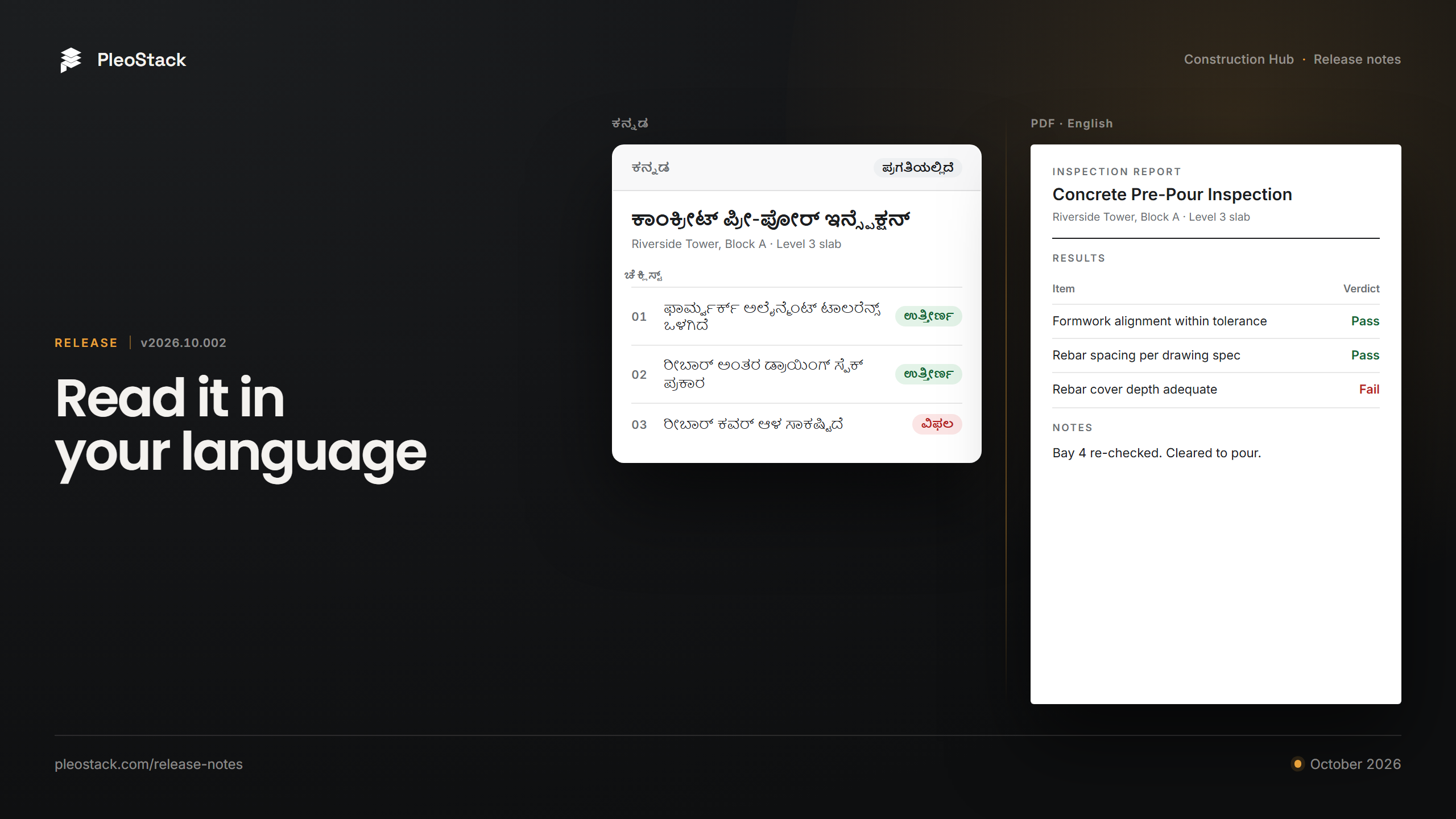
Construction Hub in Your Team's Language: The October Release
Praful Rudra · 5 min read
· Industry Insights
Why Construction Teams Outgrow Spreadsheets (and What Breaks First)
Praful Rudra · 5 min read